
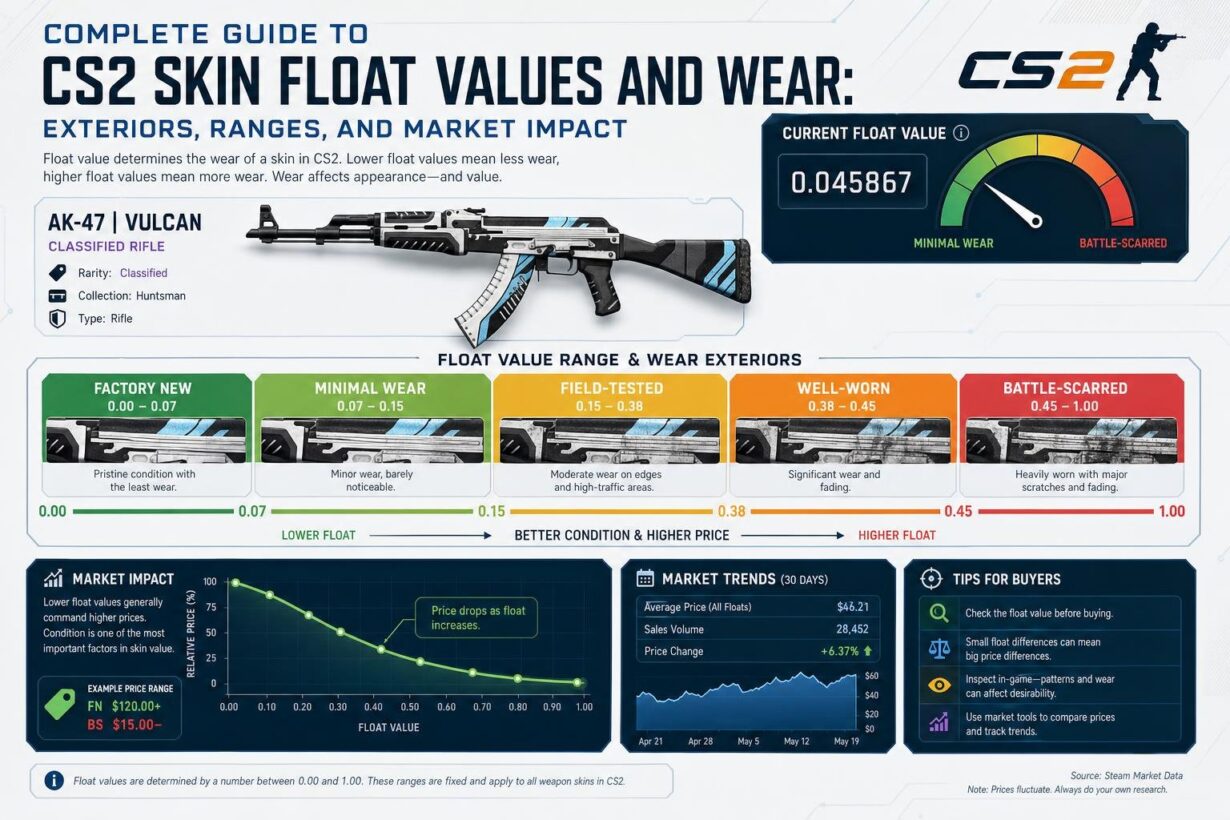

Every CS2 skin has a hidden number that controls how it looks and what it’s worth. This number is called a float value, and it ranges across a float scale from 0.00 to 1.00. Float value is a permanent number assigned when a skin is created that determines its wear condition, and lower numbers mean cleaner skins with less visual wear and damage.
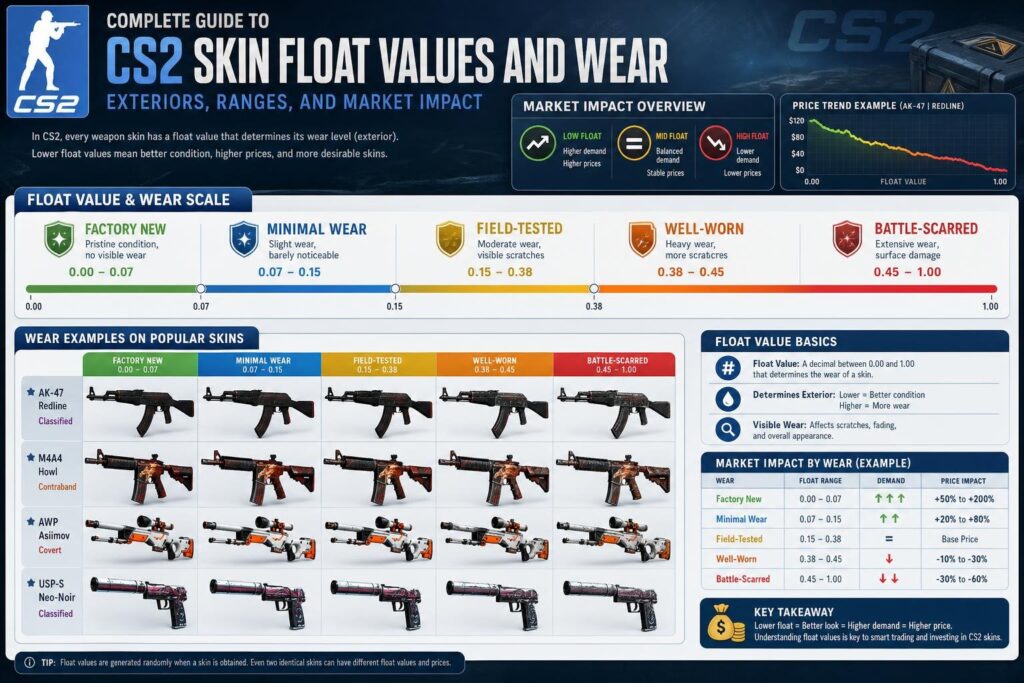
Understanding float values helps you make smarter choices when buying or skin trading. Knowing how float affects price helps you avoid overpaying for average items. The difference in appearance can mean huge price gaps, sometimes hundreds or thousands of dollars for rare skins.
This guide breaks down everything about CS2 float values and wear conditions. You’ll learn how the five wear levels work and why some floats are worth more. Whether searching for deals or collecting, knowing float values saves money and helps find better skins.
Key Takeaways
Float values between 0.00 and 1.00 determine a skin’s wear condition and never change after creation
Factory New skins typically cost 5-10 times more than Battle-Scarred versions of the same skin
Extreme float values like 0.00x or 0.99x can add 50-500% premiums for collectors
Understanding CS2 Skin Float Values
Float value is a decimal number between 0.00 and 1.00 that permanently defines how worn your CS2 skin looks. This number gets assigned when your skin is created and directly controls both its visual appearance and market value.
What Is Float Value?
Float value is a decimal number that determines the visual condition of every CS2 skin. The float value system uses a scale from 0.00 to 1.00, where lower numbers mean cleaner skins and higher numbers mean more visible wear.
A skin with a 0.01 float looks nearly perfect with minimal scratches. Many collectors aim for a perfect float of 0.00 to guarantee the highest possible visual quality. A skin with a 0.50 float shows heavy wear with significant scratching and paint damage. This numeric system creates precise differences in how your skins appear in-game.
The float value affects:
How many scratches appear on your skin
How much paint has worn away
The overall visual quality
Your skin’s market price
Lower float values command higher prices because they look cleaner. The difference between a 0.01 and 0.07 Factory New skin can mean hundreds or thousands of dollars on expensive items.
How Float Values Are Assigned
Your skin receives its float value at the exact moment it gets created. This happens when you unbox a case, receive a skin drop, or complete a trade-up contract.
The float value gets randomly assigned within the skin’s available range. Not all skins use the full 0.00 to 1.00 spectrum. Each skin has its own minimum and maximum float limits.
Common float range examples:
|
Skin |
Min Float |
Max Float |
Available Conditions |
|---|---|---|---|
|
AWP Dragon Lore |
0.00 |
1.00 |
All conditions |
|
AWP Asiimov |
0.18 |
1.00 |
Field-Tested to Battle-Scarred only |
|
Glock-18 Fade |
0.00 |
0.08 |
Factory New to Minimal Wear only |
This explains why you cannot get certain skins in specific wear conditions. If the skin’s float range does not overlap with a condition’s range, that condition cannot exist.
Float Value Versus Wear Rating
Float value and wear rating work together but serve different purposes. Your cs2 skin float is the exact decimal number, while the wear rating translates that number into a named condition.
The game converts float values into five wear tiers:
Factory New (FN): 0.00 to 0.07
Minimal Wear (MW): 0.07 to 0.15
Field-Tested (FT): 0.15 to 0.38
Well-Worn (WW): 0.38 to 0.45
Battle-Scarred (BS): 0.45 to 1.00
Two skins with the same wear rating can look dramatically different. A 0.070 Factory New skin looks much worse than a 0.010 Factory New skin, even though both display the same “Factory New” label. This is why serious traders and collectors care about the exact float number, not just the condition name.
Permanent Skin Condition
Your skin’s float value never changes after creation. The float is permanently set when the skin enters the game and stays locked forever.
Using your skin in matches does not increase wear. Trading it to other players does not alter the float. Adding stickers, name tags, or StatTrak counters leaves the float untouched. Even storing your skin for years keeps the same exact float value.
This permanence makes float values reliable for pricing and trading. You can buy a 0.01 float skin today knowing it will remain 0.01 forever. The visual condition you see when you buy the skin is the condition you will always have.
CS2 Skin Wear Levels and Float Ranges
Every CS2 skin falls into one of five wear conditions based on its float value, which ranges from 0.00 to 1.00. The wear rating determines how scratched or pristine your skin appears in-game and directly impacts its market value.
Factory New
Factory New skins have a float range of 0.00 to 0.07. These are the cleanest skins you can get in CS2, showing virtually no scratches or wear marks on their surfaces.
The exact float within this range matters significantly. A 0.01 float skin looks noticeably better than one at 0.06 or 0.07, even though both qualify as Factory New. You’ll see the brightest colors and sharpest pattern details on these skins.
Low float skins like 0.00x are extremely rare and valuable. Dedicated enthusiasts often compete to own the lowest float version of a specific skin available in the entire game. Collectors actively hunt for low-float skins because they represent the absolute best condition possible. Even a difference between 0.00 and 0.02 can add hundreds of dollars to certain popular skins.
Not all skins can reach Factory New condition. Some have float caps that prevent them from appearing in this wear level, making genuine Factory New versions impossible to obtain.
Minimal Wear
Minimal Wear covers the float range from 0.07 to 0.15. These skins show minor wear but still maintain most of their visual appeal and pattern clarity.
The difference between high Factory New (0.07-0.08) and low Minimal Wear can be almost invisible to the naked eye. Many players choose Minimal Wear as their sweet spot because you get nearly identical looks at a lower price point.
Scratches and abrasions start becoming visible as you move toward 0.15, though they’re still fairly subtle. The pattern remains clear and colors stay vibrant across most of the skin’s surface.
Your Minimal Wear skins offer solid value for money. They cost significantly less than Factory New while maintaining good visual quality that won’t distract you during gameplay.
Field-Tested
Field-Tested spans from 0.15 to 0.38, making it the widest float range among all wear conditions. You’ll notice visible scratches and wear patterns that affect the skin’s overall appearance.
The 0.15 sweet spot sits right at the boundary between Minimal Wear and Field-Tested. Skins at this exact float often look much better than their wear level suggests, giving you excellent value.
As the float increases toward 0.38, wear becomes more pronounced. Paint fading, scratches, and surface damage become obvious, though the design remains recognizable and functional.
Field-Tested skins are popular among budget-conscious players. They cost a fraction of Factory New prices while still displaying the skin’s core design and color scheme clearly enough for you to enjoy.
Well-Worn and Battle-Scarred
Well-Worn occupies the 0.38 to 0.45 range, while Battle-Scarred covers everything from 0.45 to 1.00. These represent the most damaged conditions available in CS2.
Well-Worn skins show heavy wear with significant paint loss and scratching. The design remains visible but looks faded and battle-worn, appealing to players who prefer a more realistic, used aesthetic.
Battle-Scarred skins display extreme damage. Some lose large portions of their painted design, while others develop thick patina that darkens the entire surface. High float Battle-Scarred skins approaching 1.00 can look dramatically different from their Factory New counterparts.
Despite being the cheapest CS2 skins on the market, certain Battle-Scarred items with 0.99x floats command premium prices from collectors seeking the highest float possible.
Special Float Cases and Capped Float Skins
Not all CS2 skins can exist in every wear condition. Some skins have restricted float ranges that prevent them from appearing in certain conditions, while others have narrow windows that make specific wear levels extremely rare and valuable.
Limited Float Range Skins
Many popular skins have float caps that restrict which wear conditions can exist. The AWP Asiimov has a minimum float of 0.18, which means Factory New and Minimal Wear versions are impossible. This skin only exists in Field-Tested, Well-Worn, and Battle-Scarred conditions.
The AK-47 Redline starts at 0.10 float, technically allowing Minimal Wear but making Factory New impossible. The AK-47 Vulcan is another skin where float affects price heavily, especially for collectors seeking the cleanest versions.
Understanding these restrictions helps you avoid searching for skins that don’t exist. When you check a CS2 float value through a float checker, you’ll see why certain conditions are missing from the market.
Iconic Skins with Unique Floats
The AWP Dragon Lore spans the full 0.00 to 1.00 range, making it available in all conditions. However, float value dramatically affects its price because of skin popularity and collector demand.
Doppler phase knives like the Karambit Doppler have narrow float ranges between 0.00 and 0.08. All Dopplers are Factory New only, which makes the phase pattern more important than float for most buyers.
The Blackiimov represents a special case where collectors specifically want AWP Asiimovs with float values above 0.95. These ultra-high float versions turn almost completely black, creating a unique look that commands premium prices despite being Battle-Scarred.
Low Float and High Float Collector Items
Extreme float values create collector-grade items tracked by float ranking systems. A 0.0000x float can multiply a skin’s value by 5-10x compared to average Factory New versions.
Low float collectors target skins with four or five decimal places of zeros. These items appear on global leaderboards and represent the cleanest possible versions of each skin.
High float collectors seek maximum Battle-Scarred versions, particularly for skins where extreme wear creates distinctive appearances. The closer a skin gets to its maximum float cap, the more interest it generates from this niche collecting community.
Market Impact of Float Values
Float values create significant price differences across CS2 skins, with lower floats commanding premiums that range from modest to extreme. The market treats float as a quality indicator that directly affects skin prices on platforms like the Steam Market and third-party marketplaces.
Float Premium and Price Multipliers
You’ll encounter substantial price premiums for ultra-low float values, particularly on expensive skins. A 0.000x float skin can sell for 2-10x the average Factory New price, while 0.00x floats typically command 1.5-3x premiums.
The premium structure varies by float range. Skins between 0.01-0.03 float carry moderate premiums above base pricing, while 0.03-0.069 floats represent standard Factory New market rates. On budget skins under $10, float premiums add only pennies to the price because the absolute dollar difference stays minimal regardless of percentage increases.
High-value skins above $1,000 show the most float sensitivity. Small float differences translate to hundreds or thousands of dollars in value. A 0.001 float Dragon Lore costs significantly more than a 0.06 version, even though both qualify as Factory New condition.
Factors Affecting Skin Value
Your skin’s value depends on multiple factors beyond just the CS2 wear rating. Pattern skins like Case Hardened knives are a great example where a rare Blue Gem pattern can be worth thousands more regardless of the float value.
Paint coverage determines how visibly wear appears on different skins. Skins with large painted areas show scratching more clearly at higher floats, making low floats more valuable. Anodized metallic finishes hide wear better, reducing float’s impact on skin prices.
Understanding how float affects price per skin matters when evaluating value. Some skins can’t exist in certain conditions due to restricted float ranges. An AWP Asiimov only exists in Field-Tested through Battle-Scarred because its minimum float starts at 0.18.
Rarity and demand amplify float premiums. Collectors pay extreme premiums for #1 ranked floats on popular skins, turning ownership of the lowest or highest float into a status symbol with measurable market value.
Float and Skin Economy
Float trading strategies center on identifying underpriced skins where sellers don’t recognize float value. You can profit by buying good-float Field-Tested skins at standard FT prices and reselling them at premiums to buyers who care about skin appearance.
The skin economy treats float as a permanent attribute that never changes after creation. This permanence creates a stable pricing structure where float premiums remain consistent over time, making float-based investments more predictable than other market factors.
Marketplaces handle float differently in their interfaces. Some platforms display exact float values prominently, while the Steam Market requires external tools to check floats. This information asymmetry creates opportunities for informed traders who can spot value that casual buyers miss.
Float arbitrage works best on mid-tier skins priced between $50-500. These skins show meaningful float premiums without requiring the massive capital needed for high-tier items, and they trade frequently enough to provide liquidity when you want to sell.
How to Check and Compare Skin Floats
Learning how to check float is essential for any serious collector. You can check float values through in-game inspection, dedicated online tools, or third-party marketplace listings.
Using In-Game Inspection
You can inspect any CS2 skin directly in the game by hovering over it and pressing the inspect key. This method shows you the skin’s visual appearance and wear level designation like Factory New or Field-Tested.
In-game inspection doesn’t display the exact float value number. You’ll only see the wear category, which covers a range of floats. For example, a Minimal Wear skin could have any float between 0.07 and 0.15.
This method works best when you want a quick visual check. You can see scratches, fading, and overall condition without leaving the game. The inspect window lets you rotate the weapon to examine all sides.
To inspect skins on the Steam Market, click the inspect link on any listing. This opens the skin in CS2’s inspection tool if you have the game installed.
Online Tools and Float Checkers
A CS2 float checker tool shows you the exact decimal value between 0.00 and 1.00. These online tools and float databases require you to paste an inspect link from Steam or a marketplace.
CSFloat is one of the most popular float checking services. You paste the inspection URL and get instant results showing the precise float value, paint seed, and other technical details.
Tools like the CSFloat market checker or specialized browser extensions can automatically display these numbers while you browse the Steam Market. This saves time and helps you identify low float skins quickly without clicking every individual listing.
Some tools include additional features like float rankings and pattern indexes. These help you understand if your skin has a particularly low or high float compared to others of the same type.
Third-Party Marketplaces
Many CS2 skin marketplaces display float values directly on their listings. Sites like DMarket, Skinport, and Buff163 show the exact float before you purchase.
These platforms let you filter skins by float range. You can search for Field-Tested items with floats below 0.20 or Factory New skins under 0.01. This saves time compared to checking each skin individually.
Marketplace listings often include screenshots showing the skin’s appearance at that specific float. You can compare multiple items side by side to find the cleanest version within your budget. Checking floats before purchase ensures you get fair value.
Tips for Trading and Collecting Skins by Float
Lower float values usually mean higher prices, but smart traders know that specific float ranges can offer better value. Understanding which skins are popular in certain wear conditions and how float caps affect trade-up outcomes helps you make better buying and selling decisions.
Identifying the Best Value by Float
You should look for skins with float values near wear condition boundaries to find good deals. A skin at 0.071 float is Minimal Wear but looks almost identical to Factory New, often selling for much less.
Best value float ranges:
0.07-0.08: Minimal Wear skins that look like Factory New
0.15-0.18: Field-Tested skins with minimal visible wear
0.38-0.39: Well-Worn skins cleaner than most in their condition
Skins with restricted float caps create special trading opportunities. When a skin’s float range is limited, like the Desert Eagle Blaze only existing between 0.00-0.08, any float within that range becomes more valuable. You should check float rankings for specific skins to see where your item falls compared to others.
Strategies for Float Trading
Float trading focuses on buying low float items before they gain attention and selling when demand increases. You need to track float rankings on specialized sites to identify rare low-float opportunities.
Key float trading strategies:
Buy the cleanest available – Target skins in the bottom 1-5% of their float range
Watch new releases – Early adopters can secure low floats before prices spike
Trade-up crafting – Use the adjusted float system to predict outcome floats
Flip boundary skins – Buy high-float Factory New, sell to buyers wanting the condition tag
Your success depends on understanding how the trade-up float system converts individual skin floats into outcome floats. This knowledge helps you calculate potential results before investing in trade-up contracts.
Popular Skins and Wear Preferences
Different skins maintain popularity in specific wear conditions based on their appearance and how wear affects their patterns. The AWP Dragon Lore stays valuable in all conditions, while skins like the AK-47 Redline look best in Minimal Wear since they can’t be Factory New.
Wear preferences by skin type:
|
Skin Style |
Preferred Wear |
Reason |
|---|---|---|
|
Clean designs |
Factory New |
Maximizes vibrant colors |
|
Battle-worn themes |
Field-Tested to Battle-Scarred |
Matches intended aesthetic |
|
Rare patterns |
Any condition |
Pattern matters more than wear |
You should know that collectors often pay premium prices for extremely low floats (under 0.001) or extremely high floats (above 0.99) regardless of the skin. Some players actually prefer Battle-Scarred versions of certain skins because heavy wear creates unique visual effects not visible in cleaner conditions.
Frequently Asked Questions
Float values are assigned permanently when a skin is created and range from 0.00 to 1.00, with lower numbers meaning less visible wear. The exact float number determines both how a skin looks and what it’s worth on the market.
What factors determine the float value of a CS skin?
The float value is randomly assigned when a skin first gets created in the game. This happens when you unbox a case, receive a drop, or complete a trade-up contract.
Each skin has a predetermined minimum and maximum float range that limits what values are possible. For example, the AWP Asiimov can only exist between 0.18 and 1.00, which means it never comes in Factory New or Minimal Wear conditions.
When you perform a trade-up contract, the output float is calculated using a specific formula. The game takes the average float of your 10 input skins, multiplies it by the output skin’s float range, then adds the minimum float value.
How does wear rating affect a skin’s appearance in CS?
Wear rating translates your float value into one of five condition categories: Factory New, Minimal Wear, Field-Tested, Well-Worn, or Battle-Scarred. Higher float values show more scratches, fading, and paint peeling across the weapon’s surface.
The visual difference can be dramatic even within the same wear category. A 0.01 float Factory New skin looks much cleaner than a 0.069 float Factory New skin, even though both carry the same condition label.
Different skins show wear in different ways based on their design. Paint-heavy designs reveal scratches more obviously, while metallic or anodized finishes hide wear better at the same float value.
Can the float value of a CS skin change over time or through use?
No, float values are permanent and never change after a skin is created. Using the skin in matches, trading it to other players, or keeping it in your inventory for years won’t affect the float value at all.
Applying stickers, name tags, or StatTrak counters also leaves the float value completely unchanged. The number stays exactly the same from the moment the skin enters the game until it gets deleted or trade-locked forever.
What is the range of possible float values for skin wear in CS?
The complete float system runs from 0.00 to 1.00, but most individual skins don’t span this entire range. Each skin has its own specific minimum and maximum values programmed into the game.
Factory New skins fall between 0.00 and 0.07, Minimal Wear between 0.07 and 0.15, and Field-Tested between 0.15 and 0.38. Well-Worn covers 0.38 to 0.45, while Battle-Scarred spans the largest range from 0.45 to 1.00.
Some premium skins like the Glock-18 Fade only exist between 0.00 and 0.08, meaning you can never find one in Field-Tested or worse conditions. This restricted range is why certain condition categories don’t exist for specific skins.
How can players accurately check the float value of their CS skins?
You can inspect any skin in your Steam inventory and copy the inspect link to paste into a float-checking website. These websites decode the link and show you the exact float value down to many decimal places.
Popular float checking tools include CSGOFloat, CSFloat Market, and other third-party sites built specifically for this purpose. Most of these services are free and work by reading the inspection data that Steam provides.
In-game, you can only see the general wear category like “Field-Tested” or “Minimal Wear.” The exact decimal float value is hidden unless you use external checking tools or marketplace listings that display it.
What is the impact of different wear levels on the market value of CS skins?
Factory New skins typically cost the most, with prices dropping as you move through Minimal Wear, Field-Tested, Well-Worn, and Battle-Scarred conditions. The exact price gap depends heavily on how expensive and popular the skin is.
For high-end skins worth $1,000 or more, small float differences can create price gaps of hundreds or thousands of dollars. Ultra-low floats like 0.000x command extreme premiums because collectors compete for the cleanest possible examples.
Budget skins under $10 show much smaller price differences between float values. The gap might only be a few cents or dollars, making float less important for cheaper items compared to expensive collector pieces.