

The Rust Common Ground update landed on July 2, 2026, right alongside the monthly force wipe. This rust common ground update reshapes early-wipe gameplay more than any patch in recent memory. Two new monuments, a full clan system, Softcore raid windows, and a stack of animation and performance changes all hit at once, giving you a lot to process, even with the new main menu notifications, before you even load into a fresh server.
If you have been away from Rust for a few wipes or you just want a clear breakdown of what the Common Ground update actually changes in practice, this is the guide. Each section below explains how a feature works, what it costs you, and where it fits into your wipe-day plan. The biggest additions are the Apartment Complex and Rentable Shops, two monuments that let you rent shelter and set up storefronts without ever placing a Tool Cupboard. Alongside those, the new Clan Table system, Softcore rebalances, visual updates, and a charity tie-in round out one of the most feature-dense patches Facepunch has shipped.
What The July 2 Force Wipe Means
The Common Ground patch coincides with the July force wipe, meaning every official and community server resets its map and blueprints simultaneously. That timing is intentional: Facepunch uses force wipes to ensure new systems debut on a level playing field.
How Monthly Force Wipes Reset Progress
Rust runs a forced wipe on the first Thursday of every month. On July 2, 2026, every server wiped its procedural map, which is a busy time for providers of rust server hosting. All player-built structures, inventories, and blueprints are also cleared. You start from zero: no base, no workbench tier, no learned recipes.
This cycle has been consistent since 2021, and the full wipe schedule for 2026 follows the same first-Thursday pattern. If you are planning around the next wipe, August 6 is your target.
What Carries Over And What Does Not
Your Steam-linked skins, any purchased DLC, and your unique player model persist through every wipe. Everything else resets. Blueprints, base contents, team affiliations, and map data are gone.
With Common Ground, the new Clan system also resets. Any clan you create on wipe day exists only for that wipe cycle. Keep that in mind when assigning roles and permissions at the Clan Table, because you will rebuild that structure monthly.
Why This Patch Matters For Fresh Servers
Force wipes give Facepunch the cleanest possible test environment for major features. The Apartment Complex and Rentable Shops are both monument-level additions that affect spawn-to-gearup flow. Launching them mid-wipe would skew data and frustrate players who already established bases.
Because everyone loads in at the same time with nothing, you can immediately test whether renting an apartment room is faster than a 2×2 base, or whether grabbing a shop stall early gives you a scrap advantage. The force wipe makes these comparisons fair for everyone on the server.
Apartment Complex At A Glance
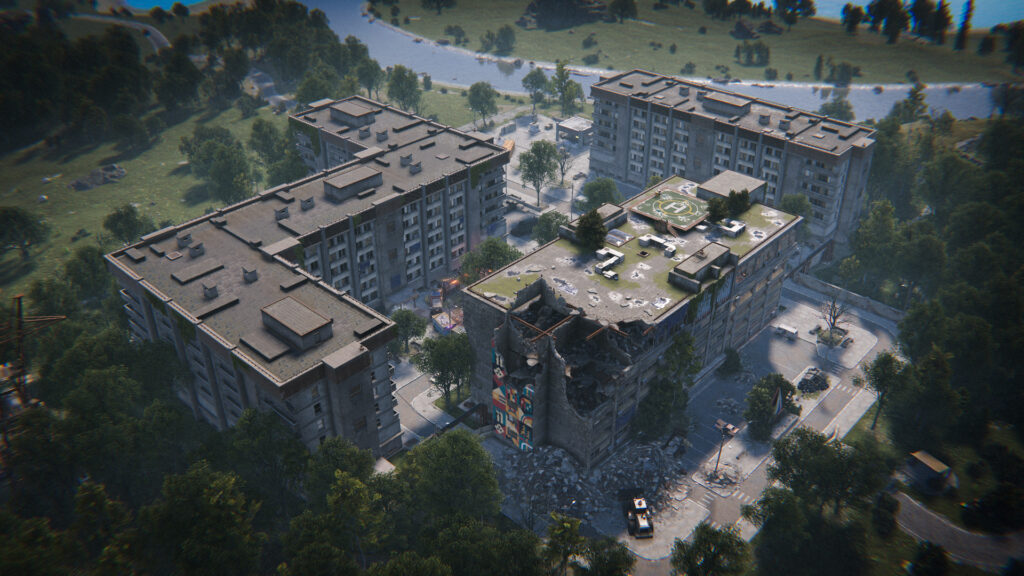
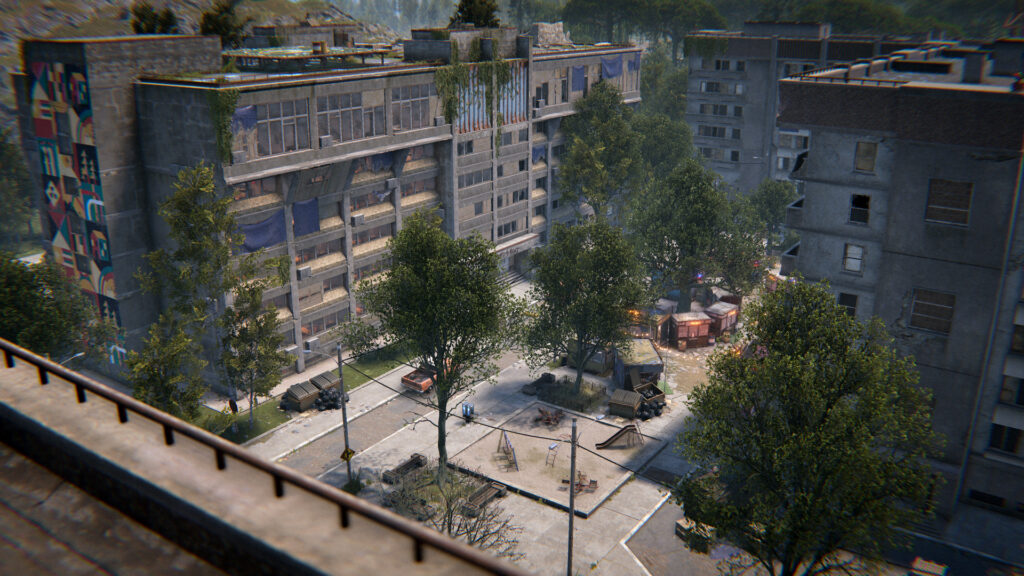
The Apartment Complex is a safe-zone monument featuring various rentable spaces and room types. These range from cramped basements to spacious penthouses, each with different storage and security tradeoffs. It introduces an alternative early-wipe shelter that skips the usual Tool Cupboard placement entirely, according to the Apartment Complex Monument Guide on Corrosion Hour.
How Room Rentals Work
You walk up to a door panel inside the monument and pay a scrap fee to access these rentable rooms. Once rented, the room is yours for as long as you maintain upkeep. No building plan, no hammer, no TC required.
Your rented room functions as a personal safe zone. You can place sleeping bags, storage boxes, and certain deployables inside. The room locks to your authorization, so other players cannot walk in unless they have a key or exploit the master-key mechanic covered below.
Basement To Penthouse Room Differences
Rooms are tiered by floor level. Basement rooms are the cheapest to rent but offer minimal storage slots and no windows. Mid-floor units cost more and provide better layouts with additional deployable space.
Penthouses sit at the top and carry the highest scrap cost. They offer the most storage, the best line of sight from windows, and extra deployable slots. You can even decorate them with items from the game room dlc.
Choose based on your budget: if you are solo and just need a safe log-off spot, a basement works. If you are running a small group and want a staging area, the penthouse might justify the expense.
Door Slot Upkeep, Eviction, And Item Seizure
Every rented room requires periodic upkeep paid in scrap through the door slot. Miss a payment window and you get evicted. Once evicted, any items left inside the room are seized and become lootable by the next tenant or disappear entirely.
This mechanic creates real pressure. You cannot just rent a room, stash loot, and forget about it. If you go offline for too long without pre-paying upkeep, you lose everything inside. Plan your play sessions around the payment cycle or treat the apartment as a temporary staging post rather than a permanent base.
How The Hidden Master Key Changes Risk
Somewhere inside the Apartment Complex, a master key can be found. Whoever holds it can open any rented room in the monument, bypassing the lock entirely. This turns the apartment from a safe zone into a calculated gamble.
If you are storing valuable kits or components in your room, the master key is a direct threat. Other players will hunt for it specifically to raid apartment dwellers without explosives. Your counterplay is simple: do not treat the apartment as a vault. Use it for convenience, not long-term storage. Keep your high-value items in a traditional base outside the monument.
Rentable Shops And Player Trading
The second new monument feature lets you buy and operate a storefront inside a dedicated marketplace area. Rentable Shops formalize player-to-player trading in a way Rust has never offered at the monument level, giving you a fixed commercial space instead of relying on vending machines outside your base.
Buying A Shop In The Marketplace
You claim a shop by interacting with its terminal and paying an upfront scrap cost. Managing inventory is easier now with improved storage adaptor sorting for those who automate their stock. Once purchased, you control what appears on the shop sign, what items are listed for sale, and the prices you set. The shop operates inside a safe zone, so buyers and sellers are protected from PvP during transactions.
As PineHosting’s breakdown of the update notes, the shops and apartments together form a single monument ecosystem designed to give players structured social interaction points on the map.
Upfront Scrap Costs And Hourly Rent
Acquiring a shop is not free. You pay an initial scrap fee to claim the space, then an ongoing hourly rent. If you stop paying, you lose the shop.
The economics here reward active traders. If you are flipping sulfur, selling guns, or moving components at a markup, the rent pays for itself. If you claim a shop and stock it poorly, you are burning scrap for nothing. Calculate your margins before committing.
The 12 Hour Opening Requirement
Your shop must remain open for at least 12 hours after you claim it. You cannot grab a stall, list a few items, and close it immediately to deny other players access to the space.
This rule prevents hoarding of shop slots. It ensures that the marketplace stays active and that storefronts rotate regularly. If you plan to use a shop, commit to stocking it for at least half a day.
Takeover Rules After Six Hours
If a shop has been closed or inactive for six hours, another player can take it over by paying the claim fee again. The previous owner’s listed items are removed, and the new owner starts fresh.
This creates a competitive dynamic. Prime shop locations near high-traffic areas will be contested. If you want to hold a good spot, keep your shop stocked and open. Letting it go idle risks losing your investment and your position in the marketplace.
Clan Tools And Softcore Rebalance
The Common Ground update introduces a formal Clan system for organized groups and makes significant changes to Softcore mode, including resource multipliers and timed raid windows. These systems target opposite ends of the player spectrum but share a common goal: making group coordination and casual play more structured.
Clan Table Features And Permissions
Clans are created and managed at a new deployable called the Clan Table. According to Facepunch’s patch notes shared via PCGamesN, clans function as an advanced version of teams with more members and role-based permissions.
You can assign roles like officer, member, and recruit, each with different access levels. Officers can invite or kick members, while recruits might have restricted permissions. The Clan Table also shows nearby clan members on your map, giving you situational awareness without third-party overlays.
Clan Chat, MoTD, And Nameplate Identity
Clans get a dedicated chat channel separate from team chat and global chat. Leaders can set a Message of the Day (MoTD) for announcements, and clan members display their clan tag on their nameplate.
The nameplate tag is a subtle but meaningful change. It makes clan affiliation visible in encounters, which changes how you assess threats. Seeing a five-person clan tag on a roaming player tells you more about the fight you are about to take than a generic nameplate ever could.
Why Clans Are Disabled In Hardcore
Hardcore mode strips away convenience features to raise the skill floor: no map, no team indicators, no compass. Clans, with their map pings and organized permissions, directly conflict with that philosophy.
Facepunch disabled the Clan system entirely in Hardcore servers. If you play Hardcore, you still coordinate the old-fashioned way: voice comms, landmarks, and callouts. This keeps the mode’s identity intact.
Softcore 2x Gather Multiplier
Softcore mode now applies a 2x gather rate for animals, food, ore, and wood. This is a significant quality-of-life boost for casual and newer players who use Softcore as their primary mode.
The multiplier cuts your farming time in half. If you previously needed 20 minutes to gather enough stone for a starter base, you now need 10. This change makes Softcore a more viable long-term mode rather than just a stepping stone to standard servers.
Raid Windows And Server-Local Timing
Softcore servers now restrict raiding to a specific window: 6 PM to 9 PM based on the server’s local time. Outside those hours, you cannot deal damage to structures or turrets within a Tool Cupboard’s radius.
This is a major shift for Softcore pacing. You can build, farm, and decorate during off-hours without worrying about an offline raid. The three-hour window concentrates all PvP base destruction into a predictable block, letting you plan your defense around a schedule instead of staying online 24/7.
Animation, Performance, And Cosmetic Additions
Beyond the headline features, Common Ground ships a batch of visual upgrades, new DLC content, and backend performance changes that affect how the game looks and runs on a daily basis.
New Rifle Sprinting Animations
Sprinting with a rifle now uses updated animations that feel more natural and less rigid. This is a continuation of the animation work Facepunch started with the Built Different update in June 2026, which overhauled player models to provide a better foundation for movement animations.
The change is cosmetic, not mechanical. Your sprint speed and accuracy penalties remain the same, but the visual feedback is smoother. The team also adjusted footstep frequency to better match the new stride animations.
One-Handed Melee Visual Updates
One-handed melee weapons like the hatchet and machete also received new sprint and swing animations. The updates make weapon handling look more grounded and less floaty, which improves visual clarity in close-range fights.
Glowing Wallpaper Pack DLC
A new DLC pack adds 27 glowing wallpapers for interior base decoration. These are purchasable cosmetic items that emit light. Inventory player model quality has also been improved to make characters look better against these new backdrops.
If you are into base aesthetics, this pack gives you a reason to build more open interiors. If you are a pure PvP player, you can skip it entirely.
Rust x Can Be Weapon Charms
New weapon charms are available as part of a crossover. These attach to your guns as small visual flair items. Other visual tweaks include the lr300 space skin ammo display and new dpv fuel bar text for better visibility.
Metal Shopfront Workshop Skin Support
The Metal Shopfront now supports Workshop skins for the first time. If you have been waiting to customize your vending setups, you can now apply community-created skins to shopfronts. Players who earn Rust skins through platforms like Rewardly or Steam Marketplace purchases can put them to use on this newly skinnable item.
Jobs 3 Performance System As Default
The Jobs 3 performance system, which was previously opt-in, is now the default threading model for all players. This change should improve frame rates on multi-core CPUs by distributing workload more efficiently across threads.
If you previously enabled useplayerupdatejobs 3 manually and noticed better performance, nothing changes for you. This update also introduces shadow caching to reduce the load on your GPU. Advanced users will also appreciate the addition of a ui scale convar and more flexible demo cfg files for content creation.
If you never touched the setting, you may see a noticeable FPS improvement, especially on servers with high entity counts. The system uses findobjectsbytype more efficiently to manage active entities in the game world.
Notable Quality-Of-Life Fixes
Several smaller fixes shipped alongside the major features:
These are incremental improvements, but collectively they smooth out friction points that have been reported since the Built Different patch.
Early Meta Impacts And What To Watch
The Common Ground update introduces systems that will take days or weeks to fully settle into the meta. Some effects are already visible on wipe day; others will emerge as players optimize around the new mechanics.
Who Benefits Most From Apartment Living
Solo players and small duos benefit the most from the Apartment Complex. You can spawn in, rent a basement room for minimal scrap, and have a safe log-off point within minutes instead of spending your first hour farming for a 2×2.
The tradeoff is the master key. Groups with the manpower to hunt for it and camp the monument can turn apartment living into a liability. For the first few wipes, expect the meta to oscillate as players figure out whether apartment rooms are worth the risk versus a traditional base.
How Shop Rentals Could Reshape Safe-Zone Economies
Rentable Shops create a centralized player marketplace for the first time. Previously, trading happened at Bandit Camp vending machines or through base-mounted shopfronts. Now, a dedicated monument space lets you set up a real storefront with sign customization and safe-zone protection.
If enough players adopt shops, you could see organized trading hubs emerge where sulfur, components, and weapons flow more efficiently. This may lower prices on commonly traded items and make scrap-to-resource conversion faster for everyone, as explored in Ronimo Games’ overview of the update’s social systems.
Likely Effects On Group Play And Solo Players
The Clan system benefits organized groups who already use Discord roles and permissions. For them, the Clan Table is a native Rust equivalent that reduces reliance on external tools. Nearby-member map pings alone justify the setup time for groups running monuments or raids.
Solo players do not gain much from clans, but the Apartment Complex and Softcore changes are directly aimed at reducing the solo disadvantage. If you typically play alone, this patch gives you more shelter options and, on Softcore, a guaranteed raid-free window to build in peace.
Why Real-Time Patch Notes Matter After Launch
Facepunch frequently ships hotfixes in the hours and days following a force wipe. Pricing on apartment rooms, shop rent costs, and raid window timing could all be adjusted based on live data. Check the official Rust changes page regularly after wipe day to catch any post-launch tweaks that affect your strategy.
Balance numbers published in pre-launch patch notes are not always final. If apartment upkeep feels too cheap or shop takeover timers are too short, expect Facepunch to tune them within the first week.
Bears For A Better World Charity Tie-In
Alongside Common Ground, Facepunch is running a Bears for a Better World charity event. Purchasable bear plushie items are available, with proceeds going to a charitable cause. The Rustafied staging preview confirmed the charity plushies were in development alongside the Apartment Complex.
If you want to support the initiative, you can pick up the plushie items through the in-game store. They are cosmetic only and have no gameplay impact, but they give you a way to contribute while playing on wipe day.